
Skip the drive-thru and deposit on the go.
You no longer need to wait for normal business hours to deposit paper checks at a Bronco office. Using your smartphone and the Bronco Mobile Digital Banking app, you only need to take a photo of the front and back of the endorsed check and shoot it over to us electronically.
Requirements for mobile deposit
On the back of the check: Sign the back of the check then write out: For Mobile Deposit Only Bronco Federal Credit Union. For checks that include a checkbox and lines to fill out, simply sign the back of the check, put a check mark in the box, and write out Bronco Federal Credit Union (date is not required but always useful).
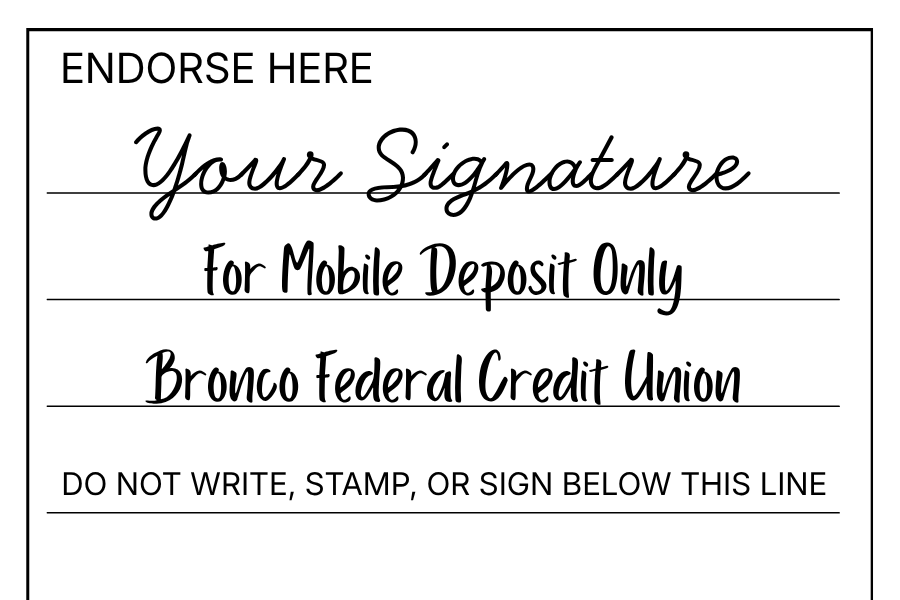
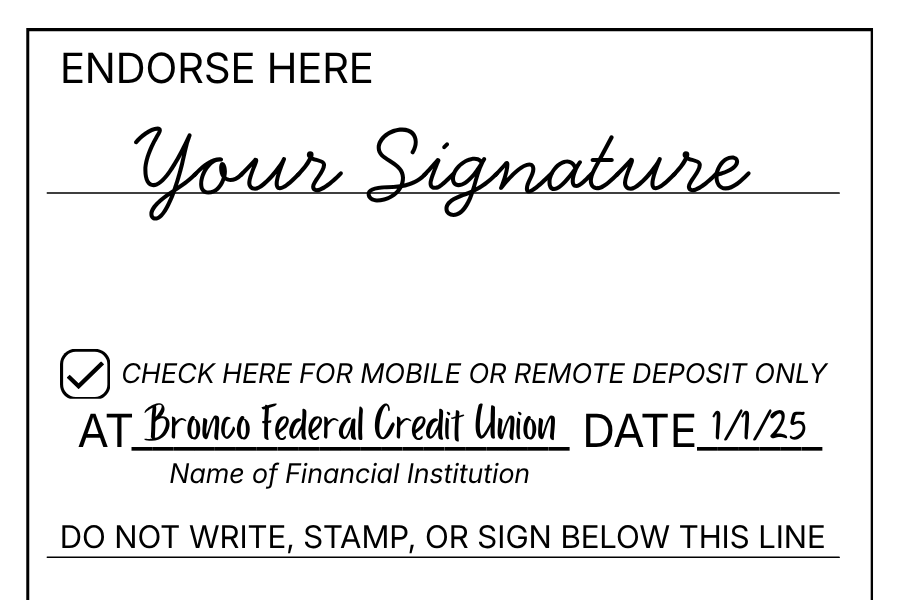
Acceptable methods of endorsement
We’ve got some Frequently Asked Questions below to help you navigate:
1. What is Mobile Deposit?
2. How much does it cost to use Mobile Deposit?
3. Am I eligible to use Bronco’s Mobile Deposit?
- Have a primary savings account.
- The account must be active and in good standing* according to Bronco’s Bylaws.
- Member must have current information on file.
4. How do I access Mobile Deposit?
- Check the eligibility criteria for this service to ensure you qualify.
- Make sure you are enrolled in Digital Banking.
- Visit the App Store® or Google Play™ and download the Bronco Mobile App.
- Open the app and activate your Mobile Banking access.
- Select the Mobile Deposit tab and follow the instructions.
- If the Mobile Deposit feature is not available to you, please contact our Member Service Center at 757.569.6000 or 800.667.2328.
5. Are deposits made using Mobile Deposit secure?
6. How should I endorse the check?
7. How many checks can I deposit using Remote Deposit?
8. What is the daily maximum amount and what do I do if my check amount exceeds the limit?
9. What type of checks can be accepted for deposit?
- The owner(s) of the account.
- Or the name of the business.
10. Are there any types of checks that cannot be submitted using Mobile Deposit?
-
- Checks or items payable to any person or entity other than you or a joint account holder.
- Checks or items drawn or issued by you or any other person on any of your accounts or any account on which you are an authorized signer or joint holder.
- Checks or times containing obvious alteration to any of the fields on the front of the check or item, or which you know or suspect, or should know or suspect, are fraudulent and otherwise not authorized by the owner of the account on which the check or item is draw.
- Checks or items drawn on a financial institution location outside of the United States.
- Checks or items not payable in U.S. currency.
- Checks or items dated more than six months prior to the date of deposit.
- Travelers check or savings bonds.
- Checks or items previously converted to a substitute check, as defined in Regulation CC.
- Checks the required authorization (i.e., COMCHEKS).
- Checks that have previously been submitted through the Service or through a mobile deposit capture service offered at any other financial institution.
- Checks that are remotely created checks, as defined by Regulation CC.
- Checks with any endorsement on the back other than that specified in this Agreement.
- Checks or items that would not be eligible for deposit at Bronco FCU in person, by mail or at an ATM.
11. Are there any holds placed and when will my deposited funds be available for use?
- Checks deposited before 4:00 p.m. ET, Monday through Friday (excluding federal holidays), and accepted for processing are generally available within two business days, subject to our Funds Availability Disclosure.
- Checks deposited after 4:00 p.m. ET, or on weekends or federal holidays, will be processed on the next business day.
- Funds availability is subject to Bronco Federal Credit Union's Funds Availability Disclosure and standard hold policy.
12. What type of accounts accept Mobile Deposit?
13. If I discover I’ve entered an incorrect amount for a deposited check, should I redeposit the check?
14. What do I do if my check is rejected in Mobile Deposit?
- Your check photos are clear and legible. Be sure there are no shadows or wrinkles on the check and that the check is not blurry.
- The check is positioned against a dark background.
- The MICR line (the bottom part of the check that includes your account number and financial institution’s routing number) is visible.
- The check number, payee, endorsement, numeric amount, written amount and MICR line are all readable.
15. How will I know if the deposit was accepted?
16. What should I do with my check after depositing it using Bronco Mobile Deposit?
For additional assistance, please contact us at 757.569.6000 or 800.667.2328. You may also send a secure email to info@broncofcu.com.

Want to join the Bronco family?
It’s easy. We have a few different ways:
Already a Bronco member and want to open another account?
You can do it online or bring your ID to one of our branches to get started.